Manifold Pocket Scanner
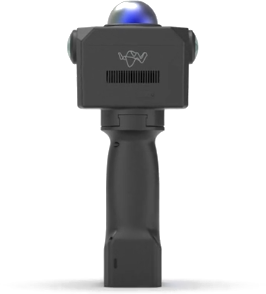
A compact handheld 3D capture unit, combining a 40-line LiDAR with dual global-shutter fisheye cameras for colourised point clouds. At 560 g and roughly the size of a hand, it is carried rather than mounted, and is used alongside a robot deployment rather than on the robot.
The usual reasons to reach for it: capturing a site before deploying a robot into it, producing a reference map to check an autonomously built one against, or recording as-built geometry where sending a robot is not practical.
Capture is previewed live and edited in the field through the MindCloud GO app; MindCloud on Windows handles the heavier processing.
This page does not repeat or replace Manifold's documentation — the manuals below are the reference for operating it.
This is the earlier model. The current one is the Manifold Pocket2 Scanner, and the desktop half of the workflow is the same for both — see the Point Cloud Processing & Export Guide.
Getting started
Before you travel to a site:
- Charge it. A full battery is about 2 hours of capture.
- Install MindCloud GO on an Android device for live preview and field edits, and MindCloud on Windows for processing. Both are in Related resources.
- Plan the session around the battery. Two hours is the practical unit — a site needing longer has to be split, so decide where the seams fall before you start rather than after the battery goes.
- Check what you are scanning. Effective range depends heavily on surface reflectivity; see the note under Specifications.
Key information
Related resources
| Resource | What it is | Where |
|---|---|---|
| MindCloud GO manual | Operating the scanner and the field app | |
| MindCloud manual | Desktop processing | |
| MindCloud GO | Field app — live preview and on-the-fly edits | Android APK |
| MindCloud | Desktop processing application | Windows |
Specifications
| LiDAR | 40 lines, 905 nm |
| Range | Up to 40 m at 10 % reflectivity · 70 m at 80 % reflectivity |
| Point rate | 200,000 points/s (first return) |
| Frame rate | 10 Hz |
| Cameras | 2 × 5 MP global-shutter fisheye, true colour |
| Battery life | About 2 hours |
| Dimensions | 115 × 110 × 83 mm (main unit) |
| Weight | 560 g (main unit) |
The two range figures are the same sensor against different surfaces. Dark, matte or wet materials sit near the 10 % end and will fall short of 40 m; bright painted walls and signage sit near the 80 % end. Plan around the lower figure for outdoor and industrial sites rather than the headline one.
Troubleshooting & FAQ
Coverage is patchy on dark surfaces
Expected — see the note above. Dark and matte materials return far less light, so effective range drops well below the headline figure. Work closer to them.
Support
Collect the serial number and the app and firmware versions before raising a ticket — Before you contact us lists what helps.