reComputer Industrial J4012
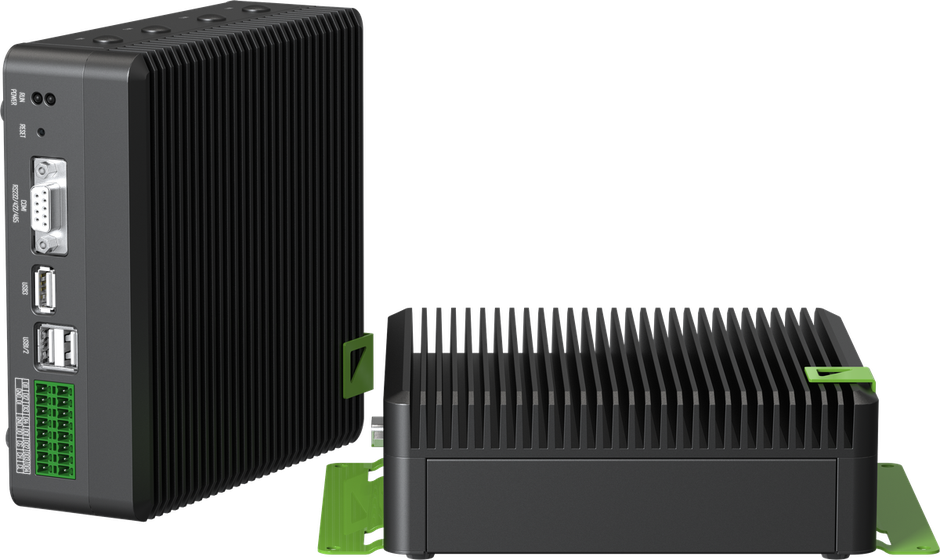
The reComputer Industrial J4012 is Seeed Studio's industrial edge AI computer, built on the NVIDIA Jetson Orin NX 16GB. It is the option to fit when the workload is perception or autonomy and needs a GPU — mapping, object detection, or anything running a neural network on-robot.
It is fanless, cooled by a passive heatsink, and enclosed, which is what makes it usable on a robot rather than on a bench.
This page does not repeat or replace Seeed Studio's documentation. It covers what you need to fit the unit to a robot and reach its interfaces; Seeed document the board itself.
Seeed Studio's own documentation:
Getting started
- Mount it to structure, not to a panel — at 1.57 kg it is heavy for a payload, and it takes desk, DIN rail, wall or VESA mounts.
- Give it airflow. It is fanless, and its temperature rating assumes 0.7 m/s of moving air across the heatsink. Sealed in an unventilated enclosure it will throttle under sustained GPU load.
- Power it through the DC 12–24 V terminal block.
- Connect over Ethernet — and note that one of the two ports supplies PoE, see Electrical interfaces.
Seeed's getting started guide covers flashing and first boot in detail.
Key information
Related resources
| Resource | What it is | Where |
|---|---|---|
| Getting started | Seeed's setup documentation for the reComputer Industrial series | Seeed Studio wiki |
Installing Weston Robot packages on the computer? Add our package repository first: Weston Robot Apt Source.
Vendor manuals, JetPack images and carrier-board detail are on the Seeed page linked above.
Electrical interfaces
| Interface | Count | Notes |
|---|---|---|
| Ethernet | 2 × RJ-45 GbE | One supports PoE-PSE (802.3af) |
| USB | 3 × USB 3.2 Gen1, 1 × USB 2.0 Type-C | The Type-C port is device mode — not a spare host port |
| Video out | 1 × HDMI 2.0 Type A | |
| Camera | 2 × CSI (2-lane, 15-pin) | |
| Serial | 1 × RS-232 / RS-422 / RS-485 | Configurable — set the mode before wiring |
| CAN | 1 × CAN | Fewer than the NanoPC, which has three |
| Digital I/O | 4 × DI/DO | |
| Power input | DC 12–24 V | Terminal block |
The PoE port (802.3af PSE) can power a PoE camera or sensor directly, rather than that device needing its own supply — subject to the platform's overall power budget.
If you are connecting the computer to a robot base over CAN, note the single interface: a platform that needs one CAN bus for the base and another for a sensor will not fit on this unit without an adapter.
Specifications
Figures for the unit as we supply it. Video encode and decode rates, environmental ratings and carrier-board detail are on Seeed's page rather than copied here.
| Module | NVIDIA Jetson Orin NX 16GB |
| CPU | 8-core Arm Cortex-A78AE v8.2, 64-bit |
| GPU | 1024-core NVIDIA Ampere, 32 tensor cores |
| AI performance | 100 TOPS |
| RAM | 16 GB LPDDR5 |
| Storage | M.2 Key M PCIe Gen4 SSD, 128 GB fitted |
| Dimensions | 159 × 155 × 57 mm |
| Weight | 1.57 kg |
| Operating temperature | −20 °C to 60 °C, with 0.7 m/s airflow |
| Mounting | Desk, DIN rail, wall, VESA |
Troubleshooting & FAQ
The unit throttles under sustained load
It is passively cooled and rated with 0.7 m/s of airflow. Check that the installation actually provides it — see Getting started.
The Type-C port will not talk to a USB device
It is a device-mode port, not a host port. Use one of the three USB 3.2 Type-A ports instead.
Support
Collect the serial number, JetPack version and logs before raising a ticket — Before you contact us lists what helps and includes the commands to gather it.