Detection review
Everything the robots observed arrives here. Whatever did the observing reports into the same place — a camera on the robot, or an analytics service running elsewhere — so this is the single record regardless of what found the thing.
The model
Two words do most of the work on this page, and they are not interchangeable.
An event is a record of something observed. It carries a type, a time, the robot that reported it, and usually an image. Every observation becomes an event, however routine.
An alert is an event the platform raised. When an event's priority is high enough, it is raised into an alert — which is what puts it in front of an operator. Everything else is recorded and searchable, but nobody is asked to look at it.
That distinction decides what you can do with a record:
| Recorded | Searchable | Reviewable | |
|---|---|---|---|
| Alert | Yes | Yes | Yes — acknowledge, or mark a false alarm |
| Event | Yes | Yes | No — there is nothing to sign off |
An event that raised no alert is not unreviewed; it is not reviewable. This is why the summary counts do not add up to the total: a detection that raised no alert appears in none of them, and one that raised two can appear in two.
Some events are moments, others last. A point event is a single instant and is the common case. An interval event — something that persists, and then ends — arrives as several records, each marked with the phase it represents, so one situation may be several rows.
Event types and priority
The platform recognises 25 event types. Each carries one of five priorities, and priority is what decides whether an event is raised into an alert — high and above are, everything below is recorded without alerting.
| Priority | Raises an alert | Event types |
|---|---|---|
| Critical | Yes | Person down · Fire or smoke |
| High | Yes | Intrusion · Perimeter compromised · Safety gear missing · Unsafe act · Altercation · Leak detected · Gauge out of range · Thermal anomaly · Equipment state abnormal · Blocked exit |
| Medium | No | Boundary crossed · Loitering · Restricted behaviour · Spill detected · Indicator abnormal · Noise threshold exceeded · Defect detected · Asset missing · Asset displaced · Channel occupied |
| Low | No | Crowd density |
| Info | No | Count report · Identity captured |
Twelve of the 25 alert. When you expect to be told about something, check which row its type sits in rather than assuming every observation reaches someone.
An event type the platform has not been told about is recorded at lowest priority as Unclassified detection and appears in the same list, so an integration can introduce new types and they are still captured and reviewable.
Working through the list
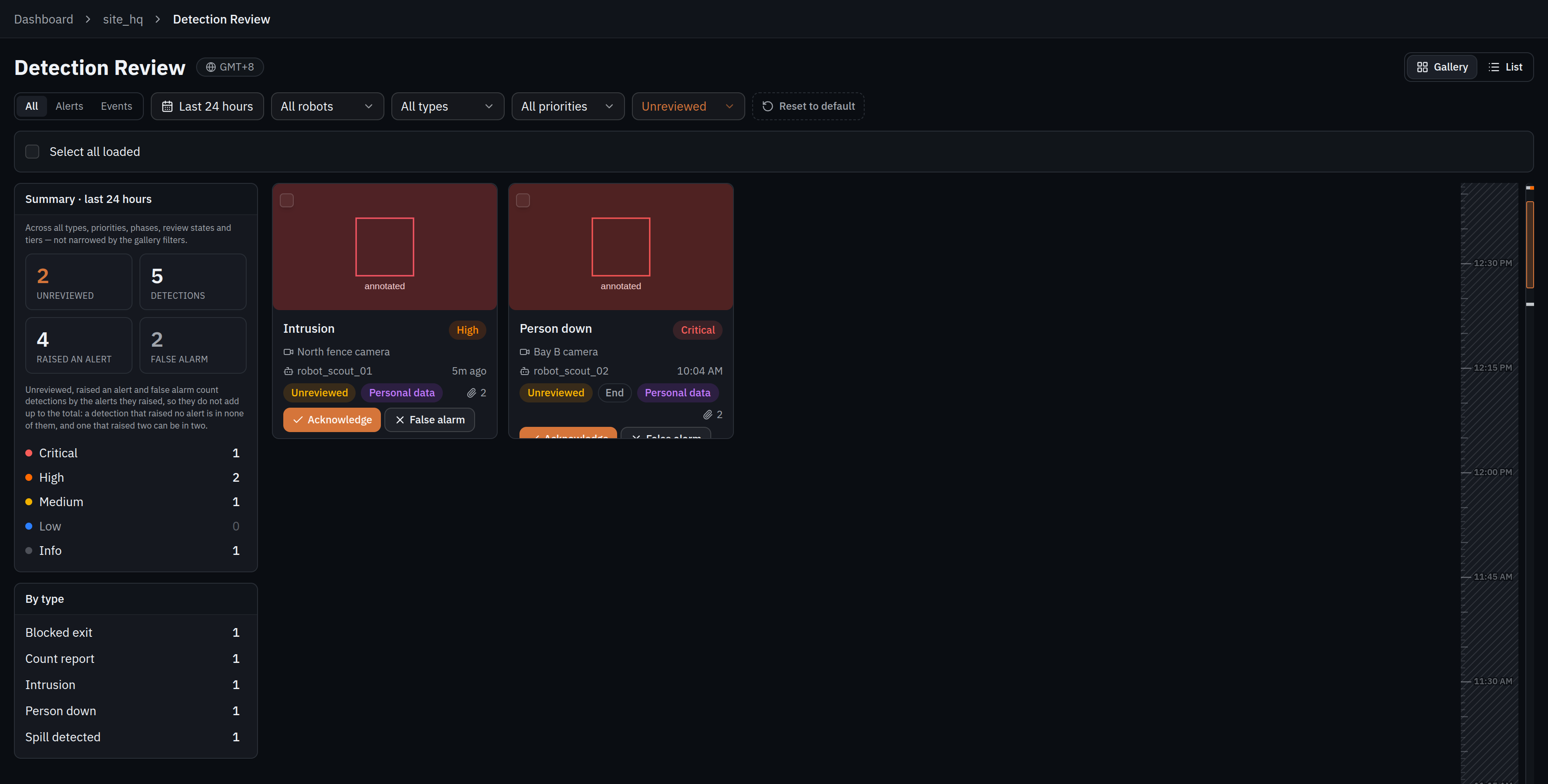
The leftmost control decides what the rest of the bar can mean: all records, alerts only, or events only. Then filter by time, robot, type, priority and review state.
Two things about the filters are worth knowing. They run on the server, so the counts describe the whole matching set rather than the page that happens to have loaded. And choosing several values within one filter widens it while combining filters narrows — two types means either type, but a type and a priority means both.
The type list offers what the current window actually contains rather than all 25, so a type you expect and cannot find is a type nothing has reported in that period.
The summary panel is not narrowed by the filters. It describes the whole window — unreviewed, total, how many raised an alert, how many were marked false alarms, with a breakdown by priority and by type — so it stays a stable picture while you work the queue down.
Reviewing
Each alert can be acknowledged or marked a false alarm, against the name of whoever did it. Records can be selected in bulk where a batch belongs to the same cause.
The two verdicts mean different things and both are worth using accurately: acknowledged says somebody saw it and it was real; false alarm says the detection itself was wrong. Marking honestly is what keeps the counts meaningful, and a run of false alarms on one type is the signal that something needs tuning.
What each record keeps
| The record holds | Notes |
|---|---|
| Type, priority and time | As assigned when the event was ingested |
| The robot and the camera | Which machine reported it, and which of its cameras |
| Evidence | The image the detection was made from, where one was stored |
| Location | Where the robot was — see below |
| Confidence | The highest confidence reported for the detection |
| Identifiers | Event and emission identifiers, with a copyable link to the record |
| Review state and reviewer | Who acknowledged it or marked it a false alarm |
Location is the robot's position, not the subject's. The record stores where the observing robot stood; there is no distance or direction to what it saw, so a detection at the far end of a corridor is marked at the robot, not at the far end. Every label on that map says "robot position" or "seen from" for exactly this reason.
Evidence is not guaranteed. A record can show that its evidence is still being retrieved, is unavailable at the moment, or was never stored at all. A detection with no image is still a valid record of an observation — it is the picture that is missing, not the event.
Records carrying personal data are badged as such, so it is clear before anyone shares a screenshot. Identity captured is the type most obviously in that class.
Records cannot be edited or deleted, and reviewer notes are appended rather than replacing what was there. That is what makes the list an evidence trail rather than a working queue: it will say the same thing when someone reads it back months later.
Common questions
Something was detected but nobody was alerted
Check which priority that event type carries in the table above. High and above raise an alert; anything below is recorded without alerting anyone. Alerts also appear in the app, so someone needs it open.
The summary numbers do not add up
They are not meant to. Unreviewed, alerted and false alarm count detections by the alerts they raised — a detection that raised no alert is in none of them, and one that raised two is in two.
One incident appears as several rows
It was an interval event — something that lasted rather than happened at an instant. Each record is one phase of it, badged with which.
A type I expect is missing from the filter
The type list offers what the current window contains, not the whole catalogue. Widen the time range.
What is an "Unclassified detection"?
An event of a type the platform has not been told about. It is recorded at lowest priority and appears in the same list, so an integration can add event types without changing what alerts.
Can I get the video of a detection?
Camera feeds are live. The still image kept with the detection is what survives, and it is what a review works from.
A record has no image
Evidence may still be being retrieved, be temporarily unavailable, or never have been stored. The event itself is unaffected.
Can a detection be corrected or removed?
Records cannot be edited or deleted. Add a reviewer note instead — notes are appended, so the original and the correction both remain.