Robot teleoperation
Teleoperation is driving a robot yourself, from the browser, when a mission is not the right tool — recovering a robot that has stopped somewhere awkward, positioning it precisely, or looking at something the cameras cannot reach on their own.
Control is held under a lease, so only one person drives at a time. The E-Stop is the exception: every role at a site may activate it without holding the lease, and releasing it is an Operator action. Taking control, the E-Stop and the rest of the control panel are covered on the Robot dashboard page.
Driving
Two input methods work at once — whichever you touch is the one giving commands.
Keyboard. W and S drive forward and back, A and D turn, and Q and E strafe sideways on robots that can. Commands are sent 15 times a second while a key is held, and the robot is sent a stop the moment you release. Keyboard driving can be switched off entirely if you would rather it were not live in a browser tab.
Gamepad. Any controller the browser reports as a standard gamepad works. The default mapping is:
| Input | Default binding |
|---|---|
| Forward and back | Left stick, vertical |
| Turn | Right stick, horizontal |
| Strafe | Left stick, horizontal |
| Emergency stop | LB |
| Push-to-talk | RB |
Each axis can be reassigned and inverted independently, which is what makes a controller that pushes the wrong way usable without relearning it. The two buttons can be reassigned or set to none.
Speed and sensitivity
| Setting | Default | What it does |
|---|---|---|
| Linear speed | 0.5 m/s | Full-stick forward and back |
| Angular speed | 1.0 rad/s | Full-stick turn |
| Lateral speed | 0.5 m/s | Full-stick strafe |
| Deadzone | 0.1 | How far a stick must move before it counts, so a resting stick does not creep |
These are the values a full deflection asks for, so lowering them makes the whole range gentler rather than capping the top — the right move for a robot working close to people or shelving.
Settings apply globally, and can be overridden per robot. Editing while a robot is open changes that robot's override; the global value is shown beside it so you can see what you have departed from, and Reset to global puts it back. A heavy outdoor machine and a small indoor one can therefore sit at different speeds without either being wrong.
What you see while driving
The driving view has its own arrangement — a primary feed filling the screen, others pinned around it, and a choice of which cameras appear at all — kept separately from the dashboard's on the Teleop tab of Stream Settings. Both tabs, and turning streams on in the first place, are covered under Arranging the view.
Which streams are running is not remembered between sessions, so a driving view opens with nothing in it until you turn feeds on. A pane whose stream is not running reads Waiting for stream…, which is the layout working and the feed absent rather than the layout being wrong.
Audio
Take Voice, on the teleop bar, claims the robot's voice channel — one person at a time, and separately from the robot's controls, so the person driving is not necessarily the person speaking.
Speaking is push-to-talk by default: hold to speak, release to stop — T on the keyboard, or the gamepad button bound to it. It can be set to always-on where an operator needs both hands, from Stream Settings.
Push-to-talk is worth keeping as the default in a shared control room, since always-on carries whatever else is being said in the room to whoever is near the robot.
Hearing the robot, and who may take or revoke the channel, are covered under Audio.
The assisted view
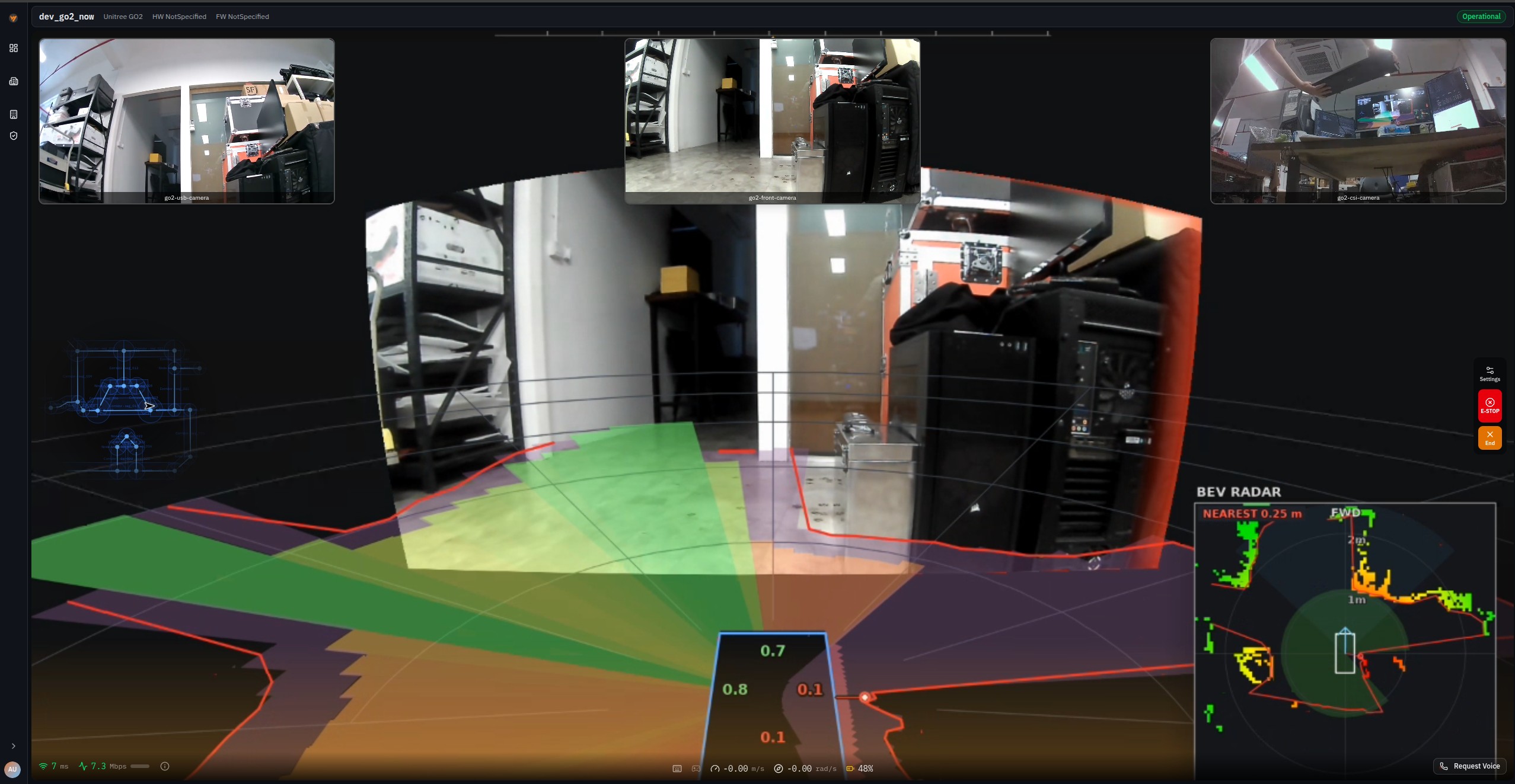
Some robots present an assisted driving view: camera feeds stitched into a surround view, proximity zones drawn from the robot's own sensing, and a bird's-eye radar panel, alongside speed, link latency and bandwidth.
It is tuned for a particular robot configuration and deployment, and is not part of every robot's teleoperation by default — what a given robot shows depends on the sensors it carries and how it was set up. Confirm which of your robots have it before planning work that relies on it.
Common questions
The robot stopped on its own while I was driving
Teleoperation stops the robot when the connection to the fleet degrades. That is deliberate — driving a machine you can no longer see is worse than halting it.
My controller drives the wrong way
Invert the axis rather than remapping it. Each of the three axes has its own invert, and the defaults suit a common controller layout rather than every one.
I changed a speed and it only applied to one robot
Expected. Editing with a robot open sets that robot's override; the global value is shown beside it, and Reset to global clears the override.
The view opened with no cameras
Streams start fresh each session rather than being restored, so nothing is running until you turn a feed on — see Which streams are running. The layout itself is remembered.
Can two people drive at once?
No. Control is held under a lease, and only one person holds it at a time.