Robot Platforms
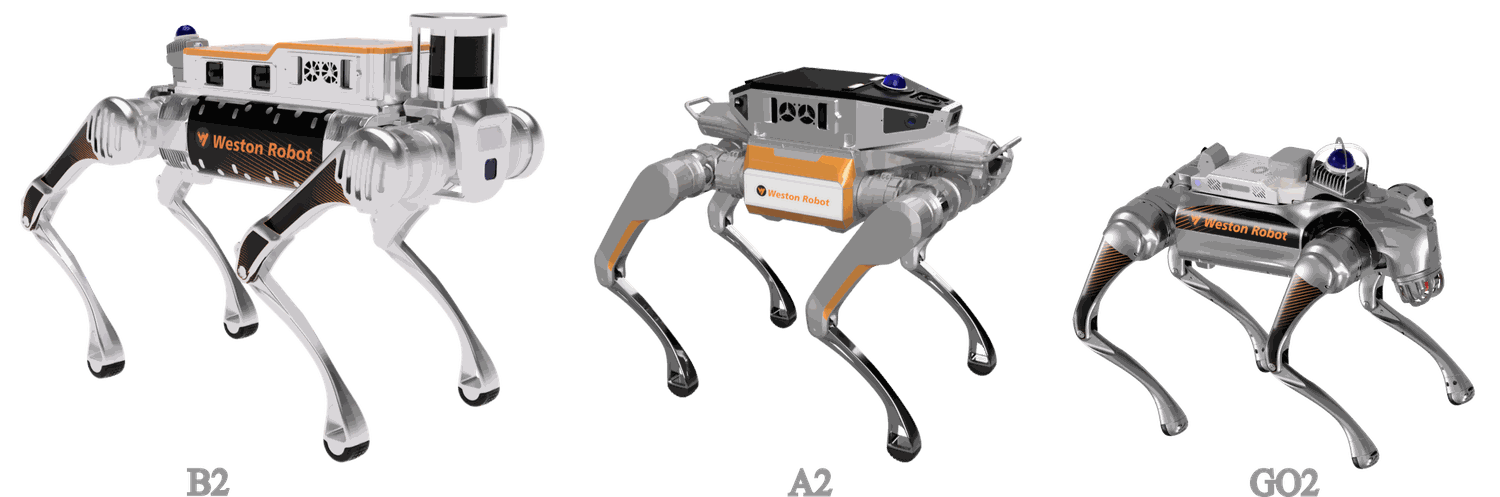
A robot platform is the robot that does the work at your site: a quadruped base carrying a Weston Robot payload — compute, networking, sensing, power and signalling — assembled, wired and tested as one unit before it ships.
Your robots are one of the three parts of a working deployment. The Robot Deployment Toolbox prepares your site once, before any robot drives there, and the Robot Management Toolbox is where your team plans, dispatches, watches and reviews the work.
Supported platforms
Three quadruped bases are supported, each carrying a Weston Robot payload. Which one you work with depends on what it is for.
| Platform | Base | Supplied for |
|---|---|---|
| B2 | Unitree B2 | Site deployment |
| A2 | Unitree A2 | Site deployment |
| Go2 | Unitree Go2 | Demonstration and evaluation |
The Go2 runs the same onboard software as the other two and behaves the same way to your operators, which is what makes it useful for evaluating the system before you commit a site. It carries a smaller payload and is not weather-sealed.
The pages linked above cover each base as Unitree supplies it — dimensions, battery, the manufacturer's own controls and documentation. This page covers what Weston Robot adds on top: the payload hardware, and the onboard software configured to run on it.
What each platform carries
| B2 | A2 | Go2 | |
|---|---|---|---|
| Compute — Jetson Orin NX | 2 | 2 | 1 |
| Cameras | ✅ | ✅ | ✅ |
| LiDAR | ✅ | ✅ | — |
| Speaker and microphone | ✅ | ✅ | ✅ |
| Industrial 5G router | ✅ | ✅ | — |
| Wi-Fi router | ✅ | ✅ | — |
| PoE switch | ✅ | ✅ | — |
| Wi-Fi connectivity | via router | via router | ✅ |
| Ethernet switch | via PoE switch | via PoE switch | ✅ |
| Warning beacon | ✅ | ✅ | — |
| Active thermal management | ✅ | ✅ | ✅ |
| Weather-sealed enclosure | ✅ | ✅ | — |
| Spare space in the enclosure | ✅ | — | — |
The bases carry sensors of their own, so the cameras and LiDAR listed here are in addition to those. The B2 and A2 are also designed to be extendable. Where a particular site or application needs something the standard payload does not have — a thermal camera, a sensor in a different position — it can be accommodated. Every addition or modification still needs integration and testing to keep the robot stable and reliable, so it is worth raising early enough for that work to be planned into your project.
Where a robot can work
Two separate things decide this, and it helps to keep them apart:
- What the hardware can do. A property of the base. These are capable machines, and they can physically reach more places than they can reach unattended.
- What the autonomy can do on its own. A property of the software on board, and today it is the narrower of the two.
- Teleoperation covers the difference. It is a normal operating mode rather than a rescue path. Uneven ground illustrates it well: the autonomy navigates it up to a point, and the legs can manage more than that — beyond it, an operator drives.
What that means for a site:
- Typical deployments. Surveyed, single-level sites, indoor or outdoor, whose layout stays stable between missions.
- Further from that. Conditions such as multiple floors, unprepared ground, or heavy foot and vehicle traffic tend to involve an operator more of the time rather than running fully unattended.
- Current capability, not a fixed boundary. We work on the autonomy continuously, and what it handles unattended keeps widening. If you are unsure where your site falls, describe it to us and we will tell you what to expect.
What a robot decides for itself
Route planning, obstacle avoidance and detection all run on the robot's own computers, so your robots do not depend on the connection to the Robot Management Toolbox in order to navigate. A gap in connectivity costs you the live view rather than the work itself.
Three situations, and what a robot does in each:
- If the connection drops. What happens is set by policy — stop safely, halt immediately, or keep going.
- If the battery is low. It will not start a mission without enough charge, and interrupts a running mission if the charge becomes critical. It docks and charges, but does not yet resume an interrupted patrol automatically from where it stopped.
- If it gets stuck. It re-plans around obstacles that were not there when the site was mapped. Where it cannot resolve a situation itself, it stops rather than improvising, and an operator takes over.
Operating and maintaining
Day-to-day operation and upkeep are covered by two general guides plus a page for quadrupeds — every platform here is one.
| What you need | Where to look |
|---|---|
| Safety, whichever platform you have | Operational Safety |
| Working near these robots | Quadruped safety — leg envelope, falls, thermal behaviour |
| Routine checks, cleaning, storage | Robot Maintenance |
| Checks specific to these robots | Quadruped maintenance — foot pads, joint play, post-fall inspection |
| Batteries and charging | Handling and charging · Care over time |
| Something is wrong | Servicing and support, below |
| By arrangement only — not a routine task | Network configuration. A delivered robot's network should be left as configured; that page is for the specific handovers where your team takes it on |
The general guides span every robot we supply, including platforms customers run themselves, so their guidance on firmware and software updates does not apply here — on a delivered platform, updates are ours.
Servicing and support
Your team can check a robot's condition at any time. The Robot Management Toolbox carries each robot's telemetry and a diagnostics view showing which subsystems are healthy, which are not, and how fresh each signal is. That is the place to look first, and it shows the robot's model and serial number.
Anything to do with the robot comes to us — the base, the payload, the onboard software, or a mission that did not run as planned. A platform is delivered as one supported unit, so there is no fault you need to route elsewhere. Before contacting us, collect what we will ask for — the model and serial number, the site, and when the problem happened.
Onboard software is updated by Weston Robot, and we coordinate maintenance and updates with your operations team.