WR65
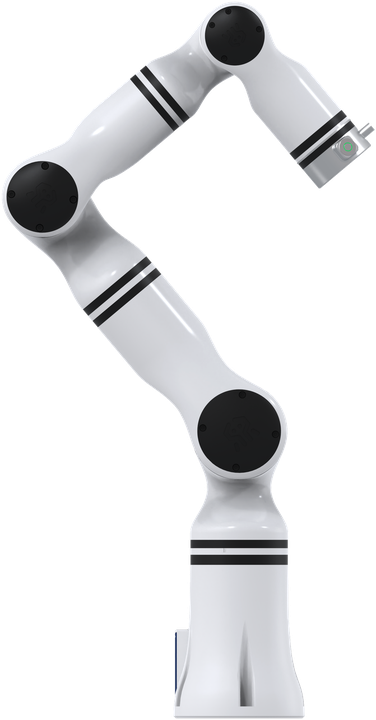
The WR65 is an ultralightweight 6-DOF manipulator, built for work where the arm has to be moved, mounted on something mobile, or fitted into a tight cell — 3C electronics, metal processing, food packaging, laboratory and retail automation.
The WR65 is Weston Robot's designation for Realman's RM65. It is the same arm: Realman make the hardware and its firmware, and we supply, integrate and support it, with our own SDK and ROS packages layered on Realman's control interface. If you are cross-referencing a datasheet or a spare part, look for the RM65.
This page does not repeat or replace Realman's documentation. It highlights the information you reach for most often, and supplements it with what we have learned from supplying and supporting these units — configuration, verified values, and our own guides.
Realman's own documentation:
Getting started
Read Operational Safety before powering the arm for the first time, including the additional hazards specific to manipulators. A manipulator moving under program control is a crush hazard — keep clear of the working envelope until you have tested your motion limits.
Bring-up in outline:
- Mount the arm on a rigid surface that can take the reaction forces.
- Connect power and the control link, following the manual for your revision.
- Confirm the arm responds before writing any motion code.
- Move to the SDK —
wr_arm_sdk, or the ROS packages if you are integrating into an existing stack.
The API reference and wire protocol documents under Related resources cover the software side in detail.
Key information
A quick reference for the things you reach for most often. Values are as configured on the units we supply.
Related resources
Files and repositories you clone or download to work with the arm. The manuals below are the ones we ship with the arm and are the ones to work from.
Documents we publish — generated from the file store, so a new revision appears here without this page being edited.
| File | Type | Version | Language | Size | SHA256 |
|---|---|---|---|---|---|
| API reference · Interface functions | v3.1 | English | 825 KB | ff1510b95577 | |
| API reference · Wire protocol | v3.1 | English | 1.1 MB | fd2196342d38 | |
| Integration guide | v1.0 | English | 3.6 MB | 48bc30092e3c | |
| User manual | v2.8 | English | 7.0 MB | 1c7282790557 |
Everything else — code repositories, maintained by hand.
| Resource | What it is | Where |
|---|---|---|
| C++ SDK | Primary development interface | wr_arm_sdk |
| ROS package | ROS 1 integration | wr65b_ros |
| ROS 2 package | ROS 2 integration | wr_arm_ros2 |
Installing Weston Robot packages on your host? Add our package repository first: Weston Robot Apt Source.
CAD models, end effectors and Realman's own tooling are on the official pages linked at the top of this page.
Variants
The suffix on your unit tells you whether it has force sensing, which is what you need for contact tasks such as assembly, insertion or polishing.
| Ours | Realman's | Force sensing |
|---|---|---|
| WR65-B | RM65 Standard | None |
| WR65-ZF | RM65 with single-axis force | Single axis |
| WR65-6F | RM65 Six-Axis Force | Six-axis force/torque |
Realman have revised the RM65 since our manuals were written, and the line-up has moved on: they currently publish two variants (Standard and Six-Axis Force) rather than three, and their figures for the force-sensing variant differ from ours — 627 mm reach and ±0.5 % FS sensor accuracy against the 638.5 mm and < 0.1 % FS in our 2023 documentation.
Reach and force-sensor accuracy are the two values to confirm from the manual supplied with your arm, or from Realman's current page, before you rely on them. Where Realman's current figures and our manual differ, the figures below follow Realman.
Key specifications
| Degrees of freedom | 6 |
| Payload | 5 kg |
| Repeatability | ±0.05 mm |
| Body weight | 7.2 kg (-B) · 7.3 kg (force-sensing variants) |
| Working radius | 610 mm (-B) — see the caution above for the others |
| Power supply | DC 24 V rated, 27 V maximum |
| Power consumption | ≤ 200 W maximum, ≤ 100 W comprehensive |
| Protection level | IP54 (arm body) |
| Materials | Aluminium alloy |
| Controller | Integrated |
| Communication | WiFi · network interface · Bluetooth · USB serial · RS485 |
| Control modes | Drag-and-drop teaching · teaching pendant · API · JSON |
Joint limits and speeds
From Realman's current parameters, and identical across the variants. The specification table in the manual we publish gives ±180° for J1, J4 and J5; plan to the ranges here. Worth having in front of you when you are planning trajectories — a pose that looks reachable can sit outside J2 or J5.
| Joint | Motion range | Maximum speed |
|---|---|---|
| J1 | ±178° | 180°/s |
| J2 | ±130° | 180°/s |
| J3 | ±135° | 225°/s |
| J4 | ±178° | 225°/s |
| J5 | ±128° | 225°/s |
| J6 | ±360° | 225°/s |
Control interface
The arm is driven through wr_arm_sdk, or directly over its JSON protocol if you are integrating from a language or environment the SDK does not cover — the wire protocol document under Related resources documents the messages.
wr_arm_sdk and wr_arm_ros2 are shared across the arm range; the ROS 1 package is per-model, so use wr65b_ros for the WR65 specifically.
Because the arm is a Realman RM65 underneath, Realman's own API samples and documentation apply to it. Where their material and ours disagree on software, ours describes the units as we supply them.
The WR65 is the ultralightweight member of the range. If you need more reach and can accept the extra mass, see the WRL63.
Troubleshooting & FAQ
Support
Collect the serial number, firmware version and logs before raising a ticket — Before you contact us lists what helps and includes the commands to gather it.